The Conversations page is your central hub for monitoring and managing all interactions between your AI agents and your customers. It provides real-time visibility into active chats, automated summaries, and detailed lead data.
Key Features
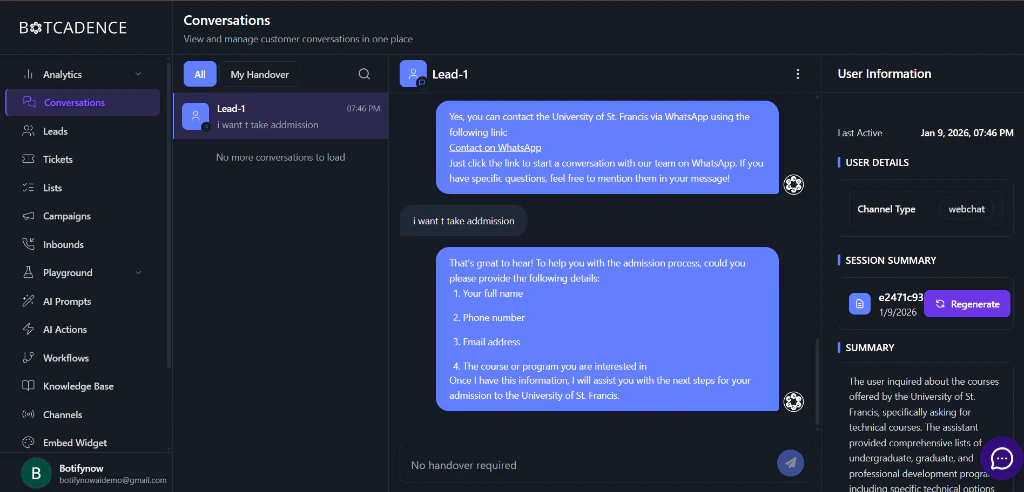
The Conversations interface is divided into three main sections to help you efficiently manage your customer relations.
1. Conversation History
On the left sidebar, you can find a chronological list of all conversations.
- Real-time Updates: New messages and conversations appear instantly.
- Search & Filter: Quickly find specific conversations or leads.
- Handover Status: See which conversations require human intervention or have been successfully handled by the AI.
2. Active Chat Interface
The central panel displays the full dialogue between your AI agent and the user.
- Full Context: View the entire message history to understand the user’s journey.
- Live Monitoring: Watch as your AI agent responds to user inquiries in real-time.
- Manual Intervention: If needed, you can take over the conversation to provide a personal touch.
3. Lead & Session Intelligence
The right sidebar provides deep insights into the user and the specific interaction.
Get a snapshot of who your user is and how they are interacting with you:
- Last Active: Track when the user was last online.
- Channel Type: Identify which platform the user is coming from (e.g., Webchat, WhatsApp, Slack).
- User Details: Any captured information like name, email, or phone number.
Session Summary
BotCadence automatically generates a concise summary of the current session. This allows your team to understand the core of the interaction at a glance without reading through the entire chat log.
- Auto-Generation: Summaries are updated as the conversation progresses.
- Regenerate: Use the Regenerate button to refresh the summary based on the latest messages.
Conversation Summary
A more detailed breakdown that analyzes:
- User Intent: What the user was specifically looking for.
- Agent Performance: How well the agent addressed the user’s needs.
- Extracted Info: Key data points extracted during the conversation (e.g., specific products of interest, intent to purchase).
Managing Leads
Every conversation is automatically associated with a Lead. As users interact with your agent, BotCadence builds a profile for them, making it easy to track their progress through your sales or support funnel.
Use the Summary section to quickly prep for a manual handover. It saves your human agents minutes of reading time!

